Turn anonymous B2B website visitors into identified companies. See which businesses are researching your product before they ever fill out a form.
How It Works
IP-to-Company Matching
Zenovay matches a visitor's IP address to the company behind it using IP intelligence:
| Method | Description |
|---|---|
| IP Intelligence | Match visitor IPs to company networks (via IPinfo and Clearbit Reveal) |
| ASN Lookup | Resolve the network operator behind the IP at the edge |
| Database Matching | Cross-reference against company firmographic databases |
Residential ISPs, mobile carriers, VPNs, and cloud/hosting ranges are filtered out so the list stays focused on real corporate visitors.
What Gets Identified
When a match is found, Zenovay enriches the company with whatever firmographic data is available:
| Data Point | Description |
|---|---|
| Company Name | Company name |
| Domain | Company domain |
| Industry | Business sector |
| Employee Count | Company size range |
| Revenue Range | Estimated annual revenue (when available) |
| Location | City, region, and country |
| Company page link (when available) |
Info
Not every field is filled in for every company. Zenovay only shows what the enrichment sources actually return, so industry or employee count may be blank for smaller or less-documented companies.
Viewing Identified Companies
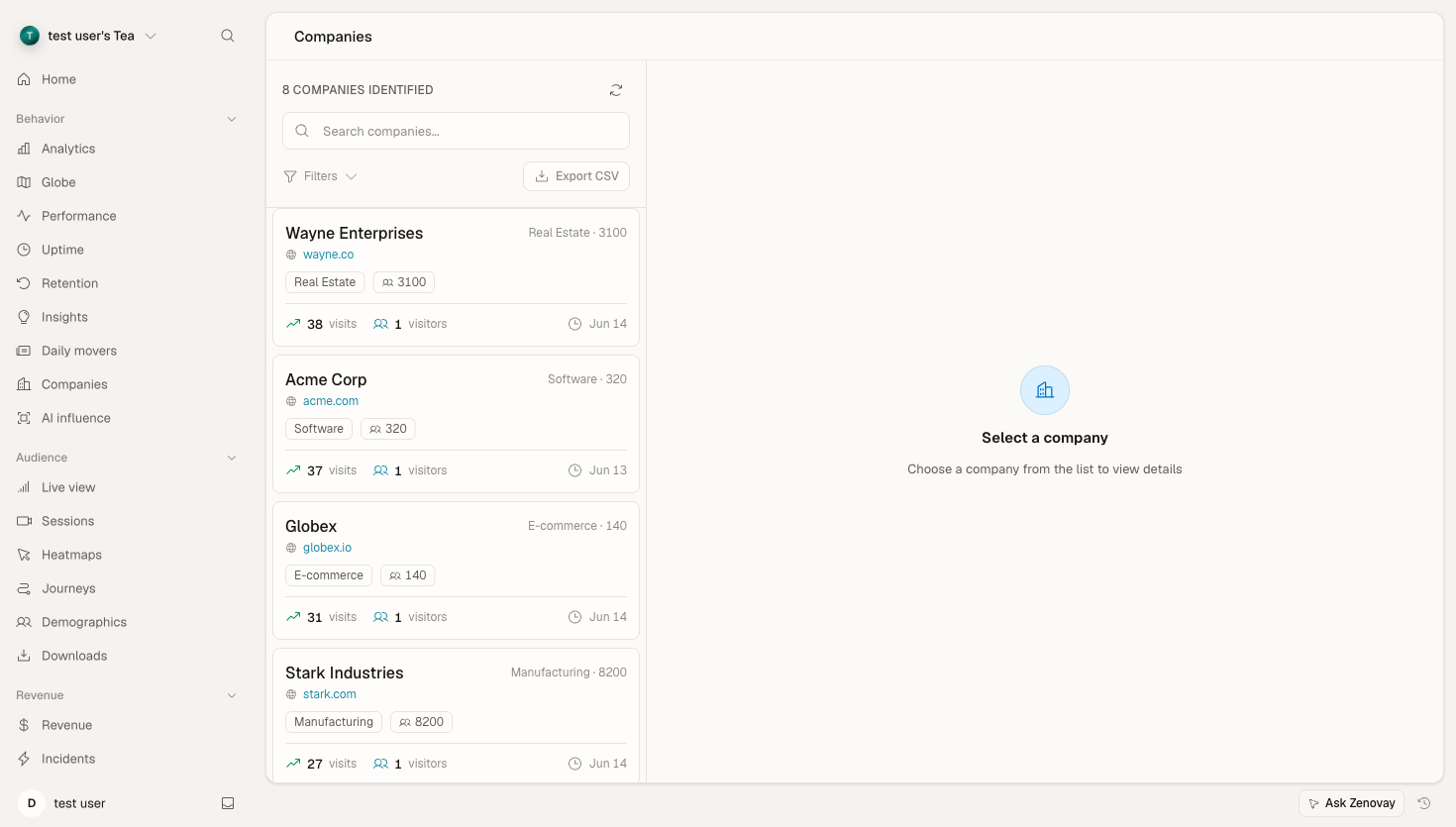
The Companies view lives on each website's dashboard.
Open your website's dashboard
Go to Domains, pick the website, and open the Companies tab (under the Behavior group in the sidebar).
Browse the list
Each card shows the company, its domain, industry, employee count, visit count, and last-seen date.
Open a company
Select any card to see its full visit history, top pages, visitor locations, and device breakdown.
Company Card
Each company shows:
┌─────────────────────────────────────┐
│ Acme Corporation         acme.com   │
│ Technology · 500-1000 employees     │
├─────────────────────────────────────┤
│ Visits: 12   Visitors: 4            │
│ Last seen: Jan 15                   │
└─────────────────────────────────────┘
Company Metrics
The list header shows a running count of how many companies have been identified for the current website. Per-company numbers (visits, unique visitors, page views) appear on each card and in the company detail view.
Scoring
Each identified company carries a confidence score — how complete the firmographic match is (name, domain, industry, employee count, revenue, location). Higher means a more reliable identification. You can sort the list by confidence to surface the best-matched companies first.
Confidence is computed automatically. There are no custom or editable scoring weights.
Filtering and Sorting
In the company list you can:
- Search by company name or domain
- Sort by visit count, last visit, confidence score, or company name (ascending or descending)
- Set a minimum visit count to hide one-off visitors
The company detail view also breaks down which pages a company viewed, its device split, and the countries the visits came from.
Company Details
Open any company to see the full picture.
Visit Timeline
A day-by-day history of when the company visited and which pages it viewed.
Page Interest
The pages the company viewed most, so you can gauge buying intent.
Visitor Locations
The countries the company's visits came from.
Device Breakdown
The desktop / mobile / tablet split for the company's visits.
Exporting Companies
You can export the full company list to CSV directly from the Companies tab.
Open the Companies tab
From your website's dashboard, open the Companies tab.
Click Export CSV
Use the Export CSV button above the list to download every identified company.
The export includes company name, domain, industry, employee count, revenue range, visits, unique visitors, page views, average session duration, source, first/last seen dates, and location. Drop the file into your CRM or spreadsheet to follow up.
Privacy & Compliance
What We Track
Company identification:
- Uses the network (business IP) behind a visit
- Identifies the company, not the individual
- Aggregates visitor activity at the company level
What We Don't Track
- Individual employee names
- Personal email addresses
- Personal devices
Our Approach
Company identification is privacy-first:
- Based on business networks, not individuals
- IP addresses are hashed before storage
- Residential and consumer networks are filtered out
Identification Accuracy
Match Rates
Identification depends heavily on traffic mix. Visitors on corporate networks match far more often than people browsing from home or mobile:
| Visitor Type | Match Likelihood |
|---|---|
| Corporate networks | Highest |
| Smaller office networks | Moderate |
| Remote / mobile workers | Low |
| Consumer / residential | Rare |
Improving Accuracy
To identify more companies:
- Drive more B2B traffic (LinkedIn, partner referrals, industry content)
- Focus campaigns on business audiences and business hours
Unidentified Traffic
For visitors Zenovay can't match to a company:
- The network may resolve to an ISP rather than a company (these are filtered out of the list)
- Standard visitor analytics still applies to that traffic
Best Practices
Review Regularly
Check the Companies tab:
- Daily for high-intent activity
- Weekly for trends
- Monthly for patterns
Prioritize High-Value Visitors
Focus on companies that:
- Visit multiple times
- View pricing or demo pages
- Match your target profile
Act Quickly
Reach out while interest is high:
- Same-day for hot leads
- Within the week for warm leads
- Personalize based on the pages they viewed
Troubleshooting
Few Companies Identified
If identification is low:
- Check that your traffic is genuinely B2B (a lot of consumer traffic won't match)
- Verify the tracking script is installed and firing
- Remember that ISP/residential networks are intentionally excluded
Company Looks Wrong
If a company name seems off:
- It may be a network operator rather than the company itself
- Sort by confidence score and focus on higher-confidence matches
Missing Recent Visits
If recent visits don't appear:
- Allow a short delay for enrichment to run
- Check your date range filter
- Confirm tracking is active